
Share & Collaborate
Use Comment Threads
Reply, @-mention, attach files, and react with emojis underneath any Heurio comment. Comment threads turn each heurio into a focused discussion you can resolve as a team.
Quick answer: open any heurio's details, scroll to Comments, and reply. Tag with @, attach files, react with emojis — the thread is shared with everyone on the project.
Heurio provides a comment thread feature under each heurio, allowing for detailed discussions and collaborative feedback. This guide offers an overview of how to use this feature effectively in both the Chrome extension and web app.
#Accessing comment threads
#Heurio extension
Open the heurio's details by clicking on the placed heurio to find the comment thread.
Commenting under a heurio with the Heurio extension.
#Heurio web app
- Open the heurio's details by clicking on its card in the web app.
- Navigate to the "Comments" tab to view and interact with the comment thread.
Commenting under a heurio in the Heurio web app.
#Capabilities
- Tagging: @-mention project members to bring them into a specific thread.
- Attachments: upload files for extra context (mockups, references, fixed-state screenshots).
- Emojis: react with emojis for quick acknowledgements without writing a full reply.
#Visual cues
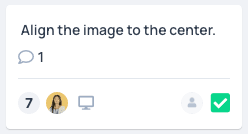
If there are comments under a heurio, a Comment bubble icon appears on the heurio card in the web app, making it easier to track feedback and follow-up.
#Why this matters
A single heurio rarely captures the entire conversation: developers ask for clarification, designers propose alternatives, PMs make trade-off calls. Threading those replies underneath the heurio — instead of in Slack or email — keeps the visual feedback and its surrounding decision history together, so anyone joining later has full context.
Frequently asked questions
- How do I @-mention a teammate in a thread?
- Type @ inside the comment input and pick the teammate from the dropdown. They'll receive a notification and a link straight to that heurio.
- Can I attach files to a thread?
- Yes. Attach screenshots, mockups, or any reference file directly to a reply — useful for sharing the 'after' design when proposing a fix.
- How do I see which heurios still have unread comments?
- Heurio shows a comment bubble icon on every heurio card that has a discussion thread, so it's easy to scan a project view and spot the comments that need a reply.
- Can I react with emojis instead of writing a full reply?
- Yes. Emoji reactions are perfect for lightweight signals — ✅ to confirm a fix, 👀 to acknowledge you've seen it, 🚀 to celebrate a resolved bug — without cluttering the thread.